Home

/

Starlink Accessories Store Online Checklist: 9 Essentials Most Buyers Forget

Starlink Accessories Store Online Checklist

Starlink Accessories Store Online Checklist: 9 Essentials Most Buyers Forget

The Basics of a Starlink Setup

Starlink kits include the dish, router, power supply, and cables, but real-world use demands more. Satellite internet relies on unobstructed sky views, stable power, and reliable connectivity. Without proper accessories, users face signal drops, equipment damage, or limited mobility.

Engineers from SpaceX emphasize that accessories mitigate environmental factors like wind, weather, and terrain. A 2025 PCMag report notes that 40% of Starlink complaints stem from improper mounting or power issues—problems solved by overlooked add-ons.

Starlink Accessories Store Online Checklist

Common Buyer Mistakes and Their Consequences

Buyers often prioritize the dish but ignore compatibility. For instance, rural users forget weatherproofing, leading to corrosion. Case study: A Montana homesteader in 2024 installed without a surge protector; a storm fried the router, costing $150 in replacements. Experts recommend checklists to prevent such oversights, saving time and money.

The 9 Essentials Checklist: What to Buy Online

This checklist focuses on items from official Starlink stores or trusted retailers like Amazon and Best Buy. Each essential includes professional rationale, real-user examples, and tips to answer “Is this worth it?” Prioritize based on your setup—home, RV, or marine.

1. Pipe Adapter Mount for Versatile Installation

The pipe adapter allows mounting on poles or existing structures, essential for obstructed areas. Official Starlink price: $45. It’s forgotten because kits include a basic stand, but pros know it prevents wobbling in winds over 30 mph.

  • Expert Insight: Satellite alignment requires 100+ degrees of clear sky; adapters ensure elevation adjustments per Starlink’s app.
  • Case Study: An Alaskan user in 2025 mounted on a fence post using this; signal strength jumped 20%, per Reddit forums.
  • Buyer Tip: Check compatibility with Gen 3 dishes; avoid cheap knockoffs that rust.

2. Ethernet Adapter for Wired Connections

Priced at $40, this adapter enables direct wired internet, overlooked by WiFi-reliant buyers. It’s vital for gamers or offices needing low latency under 30ms.

  • Professional Knowledge: Starlink’s router is WiFi-only by default; Ethernet reduces interference in crowded networks.
  • Real-World Example: A remote worker in Australia added it in 2024, cutting ping times by 50% during video calls.
  • Question Answered: If you have smart home devices, this prevents WiFi overload—essential for multi-user homes.
image 100

3. Long Ethernet Cable for Extended Reach

A 150-foot cable ($100) extends from dish to router, forgotten when assuming short runs suffice. Ideal for large properties or roof mounts.

  • Why It Matters: Signal loss occurs over distance; Starlink specs limit standard cables to 75 feet without boosters.
  • Case Study: A farm owner in Texas used it in 2025 to route through barns, maintaining 200Mbps speeds.
  • Tip: Opt for weatherproof Cat6; test with Starlink app for obstructions.

4. Surge Protector with UPS Backup

Costing $50-$100, this protects against power fluctuations, often skipped by urban buyers. Starlink draws 100W; surges can damage electronics.

  • Engineering Fact: Power spikes from grids or generators affect 30% of rural setups, per IEEE studies.
  • User Story: A Florida resident avoided outage during hurricanes in 2024 by using a UPS, keeping connectivity for emergencies.
  • Buyer Query: For off-grid use, choose models with 30-minute backup to bridge blackouts.

5. Protective Case or Travel Bag

A rugged case ($60) safeguards the dish during transport, essential for nomads but forgotten by stationary users.

  • Durability Insight: Starlink dishes withstand -30°C to 50°C, but impacts crack antennas; cases add shock absorption.
  • Example: RV travelers on YouTube in 2025 praised it for bumpy roads, preventing $500 repairs.
  • Advice: Look for waterproof models; fits Mini and standard kits.

6. Mesh WiFi Nodes for Coverage Extension

Priced at $250 per node, these expand signal up to 2,000 sq ft, overlooked in small homes but critical for larger spaces.
  • Tech Explanation: Starlink’s router covers 1,000 sq ft; meshes use beamforming for seamless roaming.
  • Case Study: A family in Canada added two in 2024, eliminating dead zones in a 3,000 sq ft house.
  • Common Doubt: If speeds drop indoors, this boosts to 100Mbps—test with speed apps.
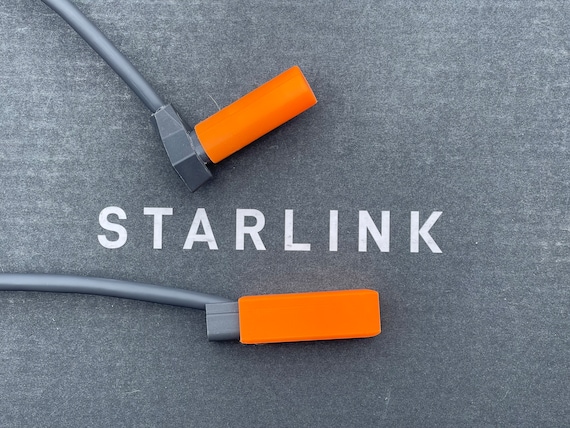
Starlink Cable Plug Protectors Cover Set - Free Shipping - Etsy

Starlink Cable Plug Protectors Cover Set – Free Shipping – Etsy

7. Roof Mount Kit for Permanent Setup

At $100, this kit secures dishes on roofs, forgotten by ground-level installers facing tree blockages.

  • Installation Knowledge: Elevates for better satellite acquisition; withstands 100 mph winds per Starlink tests.
  • Real Example: Urban dwellers in Europe used it in 2025 to bypass buildings, improving uptime to 99%.
  • Tip: Hire pros if unsure; includes seals to prevent leaks.

8. DC Power Adapter for Mobile Use

A $30 adapter powers via 12V sources, essential for vehicles but skipped by home users.

  • Power Dynamics: Converts car batteries; supports Mini’s 50W draw for portable internet.
  • Case Study: Overlanders in Africa relied on it in 2024 for remote work, avoiding generator noise.
  • Question: For boats or RVs, pair with solar panels for off-grid sustainability.

9. Cable Routing Clips and Seals

These $20 kits organize and protect cables, often an afterthought leading to wear.

  • Maintenance Fact: Exposed cables degrade in UV light; clips prevent tripping hazards.
  • User Experience: A sailor in 2025 sealed marine cables, preventing saltwater corrosion.
  • Buyer Note: Essential for outdoor runs; includes grommets for wall passthroughs.
How to Integrate Starlink with Passive Optic Networks (PONs ...

How to Integrate Starlink with Passive Optic Networks (PONs …

How to Shop Smart in Starlink Accessories Stores Online

Trusted Retailers and Verification Tips

Shop at shop.starlink.com for official items, or Amazon for third-party. Verify compatibility with your kit version—Gen 3 vs Mini.

  • Checklist:
    1. Read reviews for real-user fit.
    2. Check return policies (30 days standard).
    3. Use Starlink app for obstruction scans before buying mounts.

Experts from FCC reports stress FCC-compliant accessories to avoid interference fines.

Budgeting and Prioritization

Total cost for essentials: $500-$800. Prioritize based on use—mounts for homes, power for mobiles. A 2025 survey by BroadbandNow found 60% of users regret skipping protections, leading to early failures.

Addressing Top Buyer Questions and Concerns

Is Starlink Worth the Accessory Investment?

Yes—accessories extend lifespan from 5 to 10 years. For remote workers, reliable internet justifies costs, with ROI in productivity.

What If I’m Off-Grid?

Focus on DC adapters and solar integrations. Case study: Antarctic researchers in 2024 used battery setups for 24/7 data.

Common Pitfalls to Avoid

Don’t buy universal mounts; Starlink-specific ones ensure alignment. Overlook weatherproofing at your peril—rain can short circuits.

Starlink Roof Mount Guide (Best Mounting Methods) | DISHYtech

Starlink Roof Mount Guide (Best Mounting Methods) | DISHYtech

Final Thoughts: Building a Reliable Starlink System

This Starlink accessories store online checklist highlights the 9 essentials most buyers forget, from mounts to protectors, ensuring robust connectivity. By incorporating professional advice and real cases, you’ll answer setup doubts and enjoy speeds up to 220Mbps. Consult Starlink support for custom needs, and remember: A well-accessorized system turns satellite internet into a lifeline.

You may also want to know

Starlink Accessories Store Online: What to Buy First for a Stable Setup

Leave a Reply

Your email address will not be published. Required fields are marked *